
Last Updated on July 3, 2026 by Nurul
It’s 11:40 PM. Your exam is Friday. You’ve been staring at the same PDF for the better part of three hours — highlighting passages, re-reading paragraphs, losing the thread somewhere around page forty.
Your tablet is technically helping. But it’s also working against you.
Notifications. YouTube in another tab. A message you keep meaning to reply to. Before you know it, twenty minutes are gone and you’re watching a cooking video you didn’t plan to watch.
This is what the iPad vs. e-ink tablet debate is actually about for college students. Not refresh rates or stylus pressure sensitivity — those specs matter at the margins, not the center. The real tension is between focus and flexibility, and which one you need more depends almost entirely on how you study and what your coursework demands.
Let me walk you through both honestly.
⚡ The Bottom Line Upfront (BLUF)
- Choose an iPad (Air M2 or Pro M4) if you need a versatile all-in-one device for multimedia, note-taking, and running full apps — and you have the discipline to manage digital distractions.
- Choose an E-Ink Tablet (reMarkable Paper Pro or Kindle Scribe 2) if your primary workload is dense reading, textbook review, and hours of handwriting where glare-free comfort and total focus matter most.
- The Practical Middle Ground: Pair a simpler e-ink device with a reliable laptop. The physical separation of a “reading-only screen” signals your brain that it’s time to work, turning out to be more effective than any focus app.
📊 Full Comparison: iPad vs E-Ink Tablet (2026 Models)
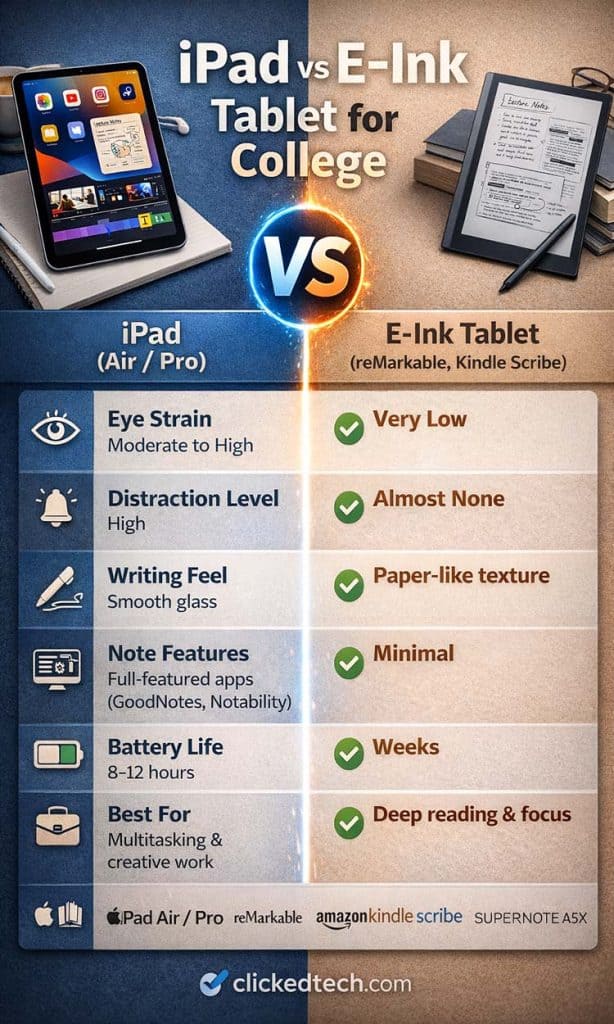
- Display Type
- iPad: LCD / Tandem OLED (emissive)
- E-Ink Tablet: E-ink (reflective, paper-like) — Winner
- Eye Strain (2+ Hours)
- iPad: Moderate to High
- E-Ink Tablet: Very Low — Winner
- Distraction Level
- iPad: High (Full iPadOS ecosystem)
- E-Ink Tablet: Near zero (by design) — Winner
- Writing Surface Feel
- iPad: Smooth glass
- E-Ink Tablet: Textured, high-friction paper feel — Winner
- Stylus Latency
- iPad: ~9ms (Pro) to ~20ms (Air) — Winner
- E-Ink Tablet: ~20–40ms
- Battery Life
- iPad: 8–12 hours active use
- E-Ink Tablet: Multiple weeks on a single charge — Winner
- App & PDF Tool Depth
- iPad: Full (GoodNotes, Notion, Audio Sync) — Winner
- E-Ink Tablet: Basic markup and organization
- Outdoor Readability
- iPad: Poor (high reflection/glare)
- E-Ink Tablet: Excellent (crisp in direct sunlight) — Winner
- Laptop Replacement?
- iPad: Yes (with Magic Keyboard) — Winner
- E-Ink Tablet: No
- Price Range
- iPad: $599 – $1,299+
- E-Ink Tablet: $349 – $599
👁️ Eye Strain & Long Study Sessions: The Physiological Case for E-Ink
Most students dismiss eye strain until it turns into a dull headache mid-way through a midterm review chapter. By then, the biological friction is already costing you retention.
The difference between these screens isn’t marketing fluff; it is physiological. iPads use emissive displays — whether the liquid crystal display on the Air or the Tandem OLED on the Pro — that generate light and project it directly toward your retinas. E-ink screens do the opposite. They use ambient, reflective light exactly like real paper. Even when using a built-in front-light for night reading, the illumination is directed down into the display matrix, not straight out into your eyes.
During a quick one-hour task, the gap doesn’t matter much. But when study sessions pass the three-hour mark on a heavy Sunday afternoon, the reflective display format leaves your eyes significantly less fatigued. If your curriculum involves reading hundreds of pages of legal text, medical case files, or literature, e-ink offers a structural health benefit that no software “Night Shift” mode on an iPad can match.
🧠 The Distraction Problem: The Hidden Cost iPads Don’t Advertise
The core advantage of an iPad is that it can run almost everything. That is also its primary flaw when trying to master complex academic topics.
The same device hosting your chemistry text also sits one swipe away from YouTube, text chains, and open browser tabs. Cognitive focus studies demonstrate that simply having access to digital distractions creates a micro-level task-switching overhead. Your brain spends a small amount of willpower actively resisting the temptation to check an open app feed.
E-ink operating systems like reMarkable’s or Amazon’s remove the choice entirely. There is no web browser worth using, no application store, and no notifications pop-up. The hardware is locked to reading, thinking, and writing. For students who naturally struggle with modern attention loops, turning a device into a dedicated single-purpose work tool is a productivity boost that no software extension or blocker can truly replicate.
[এখানে তোমার Amazon Storefront-এর প্রমোশন লিংক বা বাটনটি দেবে]
🛍️ Browse My Full Student Tech Picks on Amazon
I’ve curated my top-recommended tablets, styluses, and study accessories in one place — including the exact models mentioned in this article.
(Link: https://www.amazon.com/shop/nislam-20)
✍️ Note-Taking: Where the Comparison Gets Complicated
The dynamic shifts when you stop reading and start writing. “Better note-taking” depends entirely on how you organize your thoughts.
Stylus Latency and Response
If raw writing speed is your metric, Apple leads. The iPad Pro M4 combined with the Apple Pencil Pro brings latency down to an astonishing ~9ms, which makes the digital ink feel physically bound to the tip of the pencil. The iPad Air M2 clocks in around 20ms. E-ink tablets trail slightly behind, registering between 20ms and 40ms. While perfectly adequate for neat handwriting, rapid cursive writers will notice a tiny, split-second trailing effect on e-ink screens.
Tactile Feel
Writing on an iPad is ultimately writing with plastic on smooth glass. Even with high-end matte screen overlays, it lacks native resistance. Your hand balances a sliding motion. E-ink surfaces like the reMarkable Paper Pro feature micro-textured displays designed to create real physical friction. It sounds, feels, and catches exactly like a fine-point pen on a heavy-weight notebook. For tactile learners, this makes handwriting feel significantly more natural.
Software Intelligence
This is where the iPad runs away with the crown. Apps like GoodNotes 6, Notability, and LiquidText allow you to record audio that syncs perfectly with your real-time brushstrokes, search through handwritten text via AI OCR, color-code layouts instantly, and drag-and-drop web diagrams directly into folders. E-ink notebooks are intentionally basic: you get virtual pens, folders, and simple page structures. If your workflow requires deep media cross-referencing, the iPad is the only logical selection.
🎯 2026 Product Recommendations: The Specific Devices Worth Buying
1. Apple iPad Air M2 — Best All-Purpose Student Tablet
The sweet spot for the vast majority of college students. It provides access to the complete iOS productivity kit at a predictable mid-range price. It handles textbooks, high-end notes, video lectures, and leisure tasks effortlessly.
- Pros: Full application ecosystems (GoodNotes, Notion, MS Office); Can act as a secondary computer setup with an external keyboard; Fast M2 processing architecture handles split-screen multitasking with ease.
- Cons: Smooth glass display lacks physical paper writing resistance; Standard emissive screen can cause eye strain during marathon night sessions; Total accessory cost adds up rapidly (Pencil and case).
2. Apple iPad Pro 11-inch M4 OLED — Best for Power & Creative Majors
An absolute powerhouse device. The dual-stacked Tandem OLED screen is noticeably richer and easier on the eyes than standard tablets, and the Apple Pencil Pro adds incredibly precise squeeze and haptic gestures.
- Pros: Stunning Tandem OLED display drastically improves outdoor glare handling; ~9ms pencil speed offers the most responsive digital drawing/writing on earth; Extremely thin and lightweight profile.
- Cons: Significant financial investment for basic student note-taking requirements; Same deep digital distraction vectors as any entry-level tablet.
3. reMarkable Paper Pro — Best E-Ink Setup for Ultimate Focus
The gold standard for single-purpose academic study. The newer Canvas color e-ink system lets you highlight texts in distinct shades without an aggressive glaring backlight, creating a pure digital desk environment.
- Pros: Unrivaled physical writing friction — feels identical to paper stock; Color display allows for authentic textbook annotation and coding markup; Zero browser apps or social notifications keeps focus iron-clad.
- Cons: Requires an ongoing Connect subscription tier for robust Google Drive/Cloud sync; No audio recording sync or color screen brightness depth.
4. Amazon Kindle Scribe 2 — Best Value Budget-Friendly Reading Tablet
A massive improvement over the first generation. Featuring a sharper outer bezel design, premium out-of-box handwriting conversion, and integrated AI note summarization without recurring monthly cloud fees.
- Pros: No subscription fees needed for basic text exports or cloud backup loops; Flawless, direct scaling with global Kindle and PDF textbook stores; Exceptional battery life that routinely runs for 3 to 4 weeks.
- Cons: Lacks a color display grid (pure black & white format only); Notebook folder sorting system is basic compared to dedicated note apps.
🎯 Who Should Buy What: A Direct Answer
Choose an iPad if you:
- Intend to type the vast majority of your papers and core class materials.
- Need to stream digital audio/video lectures alongside your open book files.
- Are enrolled in software-heavy majors like Computer Science, Film, Design, or Architecture.
- Want one singular machine that can double as a laptop alternative in a pinch.
Choose an E-Ink Tablet if you:
- Spend hours digesting enormous reading assignments every day.
- Retain concepts best via physical handwriting rather than fast laptop typing.
- Regularly find yourself looking at social media tabs while trying to read core course documents.
- Already use a dependable primary laptop and just need a distraction-free digital textbook companion.
💡 The Dual-Device Strategy
The students who get the most out of e-ink tablets are typically those who use them alongside a laptop rather than instead of one. The workflow is simple — e-ink for reading, annotating PDFs, and handwritten notes during class; laptop or phone for everything else. The physical separation between “study device” and “everything device” creates a behavioral cue that’s surprisingly effective. When the e-ink tablet comes out, that’s what you’re doing.
❓ Frequently Asked Questions
Q: Is an e-ink tablet worth buying for college?
A: For reading-intensive majors — law, medicine, literature, history — yes, genuinely. The combination of paper-like comfort and zero distractions is difficult to replicate with a general-purpose device.
Q: Can an iPad replace a laptop?
A: For most students, yes, especially with a keyboard attached. The main limitation is anything requiring desktop software or multi-window workflows that get cramped on a 13-inch screen.
Q: Which handles note-taking better?
A: The iPad has better software and faster stylus response. E-ink tablets have better writing feel and fewer distractions. Neither answer is wrong — it depends on which tradeoff bothers you less.
Q: Does the reMarkable Paper Pro require a subscription?
A: Yes. The Connect subscription (~$3–8/month depending on tier) is needed for cloud sync, sharing notes by email, and integrations with Google Drive and Dropbox. Without it you can still write and read, but file transfers require USB or direct Wi-Fi. Factor this into the total cost before buying.
Q: Which device holds up better in long study sessions?
A: E-ink, and it’s not particularly close. Reflective display technology causes far less eye fatigue than emissive screens. Battery life measured in weeks means you’re never scrambling for a charger at the library. And the complete absence of app distractions means you stay in the work. For marathon study days, there’s no serious competition.
Prices and availability are accurate as of mid-2026 and may change. Always verify current pricing on Amazon before purchasing. As an Amazon Associate, I earn from qualifying purchases.

Hi, I’m Nurul! I love touching the latest gadget, unboxing them, and even smelling them! In this blog, I will share all my experiences. Hope you get the right idea about all kinds of gadgets from this blog.