
Last Updated on October 5, 2026 by Nurul
Finding the best tablet under $300 in 2026 is much easier than it was a few years ago. Budget buyers can now get large high-resolution displays, smooth 90Hz or 120Hz refresh rates, capable processors, expandable storage, and surprisingly good battery life — without moving into premium-tablet pricing.
There is an important catch, though: not every cheap tablet is a good deal. A low price can hide compromises in performance, software, display quality, accessories, or long-term support. That is why we focused on tablets that offer a genuinely useful combination of hardware, software, display quality, battery life, and everyday usability.
Whether you want a tablet for streaming, web browsing, reading, casual gaming, remote work, or studying — these are the budget models worth considering in 2026.

| ⚡ Bottom Line Upfront (BLUF) Best Overall: Lenovo Idea Tab Plus — large 2.5K display, big battery, microSD, productivity-ready. Best Samsung Pick: Galaxy Tab A11+ — smooth 90Hz screen, familiar ecosystem, $249.99 base price. Best for Entertainment: Lenovo Tab Plus — 8 speakers + built-in kickstand, nothing else comes close for media. Best Display Value: Xiaomi Redmi Pad 2 — 11″ 2.5K 90Hz screen and a 9,000mAh battery at a budget price. Cheapest Sensible Option: Amazon Fire HD 8 — fine for basic streaming and reading, but remember the Fire OS limitation. |
📊 Quick Picks: Best Tablets Under $300
| Tablet | Best For | Price Tier |
| Lenovo Idea Tab Plus | Best Overall | Under $300 |
| Samsung Galaxy Tab A11+ | Best Samsung Value | Under $300 |
| Lenovo Tab Plus | Best for Entertainment | Under $300 |
| Xiaomi Redmi Pad 2 | Best Display Value | Under $300 |
| OnePlus Pad Go 2 | Best Large-Screen Budget | Around $300 |
| Amazon Fire HD 8 | Best Cheap Streaming Tablet | Budget |
| Amazon Fire HD 10 | Best Affordable Media Tablet | Budget |
Price note: Tablet prices change frequently, especially during Amazon and manufacturer promotions. A model listed under $300 may temporarily move above or below the $300 threshold.
1. Lenovo Idea Tab Plus — Best Overall Tablet Under $300
| Best For: Overall value, productivity, students, entertainment |
The Lenovo Idea Tab Plus is one of the strongest new options in the sub-$300 category because it does not feel like a stripped-down budget tablet. Its biggest advantage is the 12.1-inch 2.5K display: 2560×1600 resolution, up to 800 nits in high-brightness mode, and 96% DCI-P3 color coverage. Add up to 12GB of memory, 256GB of storage, a 10,200mAh battery, and 45W fast charging — and you have a genuinely complete package for studying, streaming, split-screen work, and documents. It also supports a Lenovo Tab Pen and keyboard accessories, though these are sold separately.
| ⚠ Hidden cost: Accessories can significantly increase the total cost. Price in your keyboard and pen before comparing against competitors. |
| ✅ PROS • Excellent large 2.5K display for the money • Strong 10,200mAh battery capacity • Good productivity potential with pen + keyboard support • microSD expansion slot • Four Dolby Atmos speakers • Android 15 out of the box | ❌ CONS • Larger and heavier than compact tablets • Accessories are not always included • Less portable than 10-inch class tablets |
| Verdict: If you want the most complete tablet experience under $300, the Idea Tab Plus belongs at the top of your list. It earns the best overall pick. |
2. Samsung Galaxy Tab A11+ — Best Samsung Tablet Under $300
| Best For: Everyday use, streaming, students, Samsung ecosystem |
Samsung’s Galaxy Tab A11+ brings a more modern hardware package to the affordable end of Samsung’s tablet range. The 11-inch display supports up to a 90Hz refresh rate, while the tablet offers expandable microSD storage and quad speakers with Dolby Atmos audio. The base 6GB/128GB configuration launched at $249.99 — directly inside our target budget — and has appeared at lower promotional prices during sales. If you’re already in the Android ecosystem and want the peace of mind that comes with a major brand’s software support and update track record, this is the safe mainstream choice.
| ✅ PROS • Trusted mainstream brand with long support track record • Smooth 90Hz display • Expandable storage via microSD • Good quad-speaker audio • One UI is clean and practical • Optional 5G on supported models | ❌ CONS • Display resolution not as high as some Lenovo/Xiaomi rivals • Not designed for demanding professional workloads • Performance is mid-range at this price |
| Verdict: The Galaxy Tab A11+ is the safe, sensible choice for buyers who prefer Samsung and want a capable everyday tablet without approaching flagship prices. |
3. Lenovo Tab Plus — Best Budget Tablet for Entertainment
| Best For: Movies, music, streaming, reading |
If entertainment is your priority, the Lenovo Tab Plus has one major advantage that almost no other budget tablet can match: eight speakers. Lenovo originally positioned the Tab Plus around its unusually strong audio system, paired with a built-in kickstand and a solid 11.5-inch display. At a launch price of $289.99, it sits comfortably in the under-$300 category. The built-in kickstand is particularly practical for watching YouTube, Netflix, or long-form lectures without needing a separate stand or propping the tablet against a water bottle.
| ✅ PROS • Eight-speaker audio system is genuinely impressive • Built-in kickstand eliminates need for a case/stand • Strong battery life • Great for media consumption and long reading sessions • Useful reading mode | ❌ CONS • Heavier than compact competitors • Performance is not its primary selling point • No cellular option available |
| Verdict: For someone who mainly wants a cheap tablet for Netflix, YouTube, music, and casual reading, the Lenovo Tab Plus is difficult to beat. |
4. Xiaomi Redmi Pad 2 — Best Display Value Under $300
| Best For: Reading, streaming, browsing, general use |
The Redmi Pad 2 demonstrates just how far display technology has moved into the budget category. It features an 11-inch 2560×1600 panel with up to 90Hz refresh rate, a MediaTek Helio G100-Ultra processor, up to 8GB RAM, 256GB storage, microSD expansion, and a 9,000mAh battery. For reading PDFs, browsing websites, watching movies, and scrolling through long documents, the extra resolution makes this tablet noticeably more comfortable than many cheaper HD or FHD alternatives — and the large battery means you rarely have to think about charging during a study session.
| ⚠ Hidden cost: 18W charging is relatively slow compared to the 33–45W charging found on competing models at this price. Factor that in if you charge often. |
| ✅ PROS • Excellent 2.5K display for the price • Large 9,000mAh battery • Expandable microSD storage • Good all-round multimedia experience • Strong value per dollar | ❌ CONS • 18W charging is slow by 2026 standards • Not designed for demanding workloads • Accessory availability varies by market |
| Verdict: If display quality is your top priority, the Redmi Pad 2 is one of the most compelling budget choices available in 2026. |
| 🛍️ Browse My Full Student Tech Picks on Amazon I’ve curated my top-recommended tablets, accessories, and study gear in one place — including every model mentioned in this guide. ➔ Visit My Amazon Storefront |
5. OnePlus Pad Go 2 — Best Large-Screen Budget Tablet
| Best For: Productivity, entertainment, large-screen users |
The OnePlus Pad Go 2 pushes the budget-tablet formula toward a larger, smoother display. It features a 12.1-inch 2800×1980 LCD running at up to 120Hz, the MediaTek Dimensity 7300-Ultra processor, 8GB RAM, 128GB storage, and a 10,050mAh battery with 33W charging. The 120Hz panel is a real advantage here — at this price, that refresh rate is uncommon and makes scrolling and general navigation feel noticeably smoother. It also supports a separately sold Stylo stylus for handwriting and drawing.
| ⚠ Hidden cost: Storage is capped at 128GB with limited upgrade paths. The stylus costs extra. Regional availability can also vary — check your market before buying. |
| ✅ PROS • Large 12.1-inch high-resolution display • 120Hz refresh rate at this price is unusual • Strong 10,050mAh battery • 33W fast charging • Good everyday performance for productivity | ❌ CONS • Storage options are limited • Stylus sold separately • Availability varies by region |
| Verdict: A strong choice if your priority is a large, smooth display without moving into expensive tablet territory. |
6. Amazon Fire HD 8 — Best Cheap Tablet for Basic Use
| Best For: Streaming, reading, casual browsing on a tight budget |
If your goal is simply to spend as little as possible on a functional device, the Amazon Fire HD 8 remains relevant in 2026. The latest version uses an 8-inch 1280×800 display, comes with 32GB or 64GB of storage, and supports microSD expansion. Its compact size makes it convenient for travel and light reading. The biggest limitation is not hardware — it is the Amazon software ecosystem. Fire tablets do not provide the standard Google Play experience, which matters if you rely on Google Classroom, Google apps, or specific Android applications.
| ⚠ Hidden cost: Fire OS is the real limitation, not the hardware. If you need Google apps, a standard Android tablet from Samsung, Lenovo, or Xiaomi will serve you better. |
| ✅ PROS • Very affordable entry price • Compact and lightweight • microSD expansion support • Good enough for streaming and reading • Amazon ecosystem works well if you use Alexa | ❌ CONS • Low-resolution 1280×800 display • Limited app ecosystem (no standard Google Play) • Not suitable for serious productivity or study apps |
| Verdict: Buy it when low price and basic entertainment matter more than flexibility. Know what you’re getting into with Fire OS before you buy. |
7. Amazon Fire HD 10 — Best Affordable Media Tablet
| Best For: Streaming, browsing, casual household use |
The Fire HD 10 sits between ultra-cheap compact tablets and more capable Android mid-range models. Its clearest strength is simple: a larger screen for relatively little money, well-suited to video streaming, web browsing, and basic household use. Like the Fire HD 8, however, its software environment is the major consideration. If you depend heavily on Google Play applications, a conventional Android tablet from Samsung, Lenovo, or Xiaomi will usually be a better fit.
| ✅ PROS • Large display at a low price • Good for streaming and casual use • Amazon ecosystem integration is seamless • Decent battery life | ❌ CONS • Limited Google Play access • Not designed for demanding productivity use • Hardware is less capable than newer $200–$300 Android competitors |
| Verdict: A sensible low-cost media tablet — but not the first recommendation if you need productivity, Google apps, or modern performance. |
📋 Full Comparison: Best Tablets Under $300
| Tablet | Display | Best For | Main Advantage | Main Weakness |
| Lenovo Idea Tab Plus | 12.1″ 2.5K | Overall | Display + battery | Large & heavy |
| Galaxy Tab A11+ | 11″ 90Hz | Everyday use | Samsung ecosystem | Lower resolution |
| Lenovo Tab Plus | 11.5″ | Entertainment | 8 speakers + kickstand | Heavy, no cellular |
| Redmi Pad 2 | 11″ 2.5K 90Hz | Display value | Screen + big battery | Slow charging |
| OnePlus Pad Go 2 | 12.1″ 120Hz | Large-screen use | Display + performance | Limited storage |
| Amazon Fire HD 8 | 8″ HD | Basic use | Low price | Fire OS limits |
| Amazon Fire HD 10 | 10″ | Streaming | Large affordable screen | App limitations |
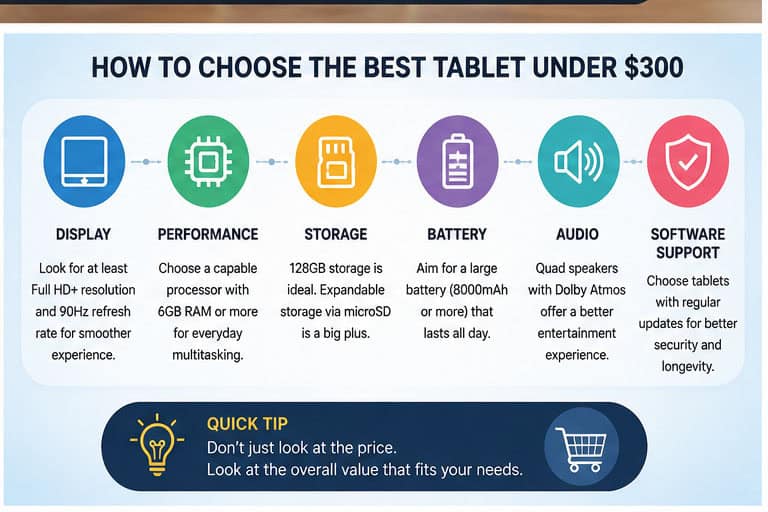
🧭 How to Choose the Best Tablet Under $300
Price should not be your only consideration. A $180 tablet that does everything you need can be a better purchase than a $290 model with features you will never use.
For Studying & Note-Taking
Prioritize display quality, stylus support, multitasking capability, battery life, and smooth PDF handling. The Lenovo Idea Tab Plus, Galaxy Tab A11+, or a discounted stylus-compatible model will serve you better here than a basic Fire tablet.
For Streaming & Movies
Look for a large screen, good speakers, high resolution, and strong battery life. The Lenovo Tab Plus stands out here because of its eight-speaker system and built-in kickstand — there is genuinely nothing like it at this price for media.
For Casual Gaming
Do not automatically reach for the cheapest option. Look for a newer mid-range processor (Dimensity or Snapdragon), at least 6GB RAM, a 90Hz or higher refresh rate, and adequate storage. Entry-level Fire tablets are not suitable for gaming beyond very basic titles.
For Reading & PDFs
Screen quality matters more than raw processing power here. An 11-inch 2K or 2.5K display makes long documents considerably more comfortable. The Redmi Pad 2 and Lenovo Idea Tab Plus are both strong for this specific use case.
💾 How Much RAM Do You Need in a $300 Tablet?
For 2026, here is a simple rule:
| 4GB | Basic use only — browsing, streaming, light reading |
| 6GB | Good minimum for everyday multitasking |
| 8GB | Sweet spot — handles split-screen, productivity apps comfortably |
| 12GB | Useful for heavier workloads and longer-term headroom |
Don’t buy a tablet simply because it advertises a large RAM number. Processor performance, software optimization, and storage read/write speeds also matter — a fast 6GB tablet often outperforms a slow 8GB one.
📦 Is 128GB Enough in 2026?
For most people, 128GB is the practical starting point. It is sufficient for apps, documents, PDFs, photos, streaming downloads, and casual games. If you store a lot of offline video, large games, or high-resolution media, consider 256GB — or look for a tablet with a microSD slot as a fallback. This is one reason the Galaxy Tab A11+, Redmi Pad 2, and Lenovo Idea Tab Plus all stand out: they all offer expandable storage.
💻 Can a $300 Tablet Replace a Laptop?
Sometimes — but not always. A sub-$300 tablet is genuinely good for web browsing, email, documents, online classes, streaming, reading, light productivity, and video calls. Serious desktop workloads, full desktop software, or heavy coding environments still require a Windows laptop or a considerably more powerful tablet.
If you’re deciding between the two, see our detailed guide: Tablet vs. Laptop for College in 2026: The Honest Verdict
⚠️ What to Avoid in a Cheap Tablet
| ❌ What to Avoid in a Cheap Tablet • Very old processors: A cheap tablet isn’t a bargain if it feels slow after a few months. • Only 2–3GB RAM: Severely limits multitasking and app performance. • Low-resolution display: A large screen with poor resolution still produces a disappointing reading experience. • Unknown brands: Hardware specs don’t tell the whole story — software support matters. • Accessories that spike the price: A $249 tablet can become $350+ after adding a keyboard, pen, and case. • No Google Play when you need it: Amazon Fire tablets are great for some things, but not if you rely on Google apps. |
🏆 Our Final Verdict: Best Tablet Under $300
There is no single winner for every buyer. Here is the breakdown by use case:
| 🥇 Best Overall Lenovo Idea Tab Plus — Large 2.5K display, strong battery, microSD, pen + keyboard support. |
| 🥈 Best Samsung Option Galaxy Tab A11+ — Familiar ecosystem, smooth 90Hz display, solid everyday performance. |
| 🥉 Best Display Value Xiaomi Redmi Pad 2 — 2.5K 90Hz panel and 9,000mAh battery make it compelling for the price. |
| 🎬 Best for Entertainment Lenovo Tab Plus — Eight speakers + built-in kickstand — nothing else matches it for media. |
| 📺 Best Large Screen OnePlus Pad Go 2 — 12.1″ 120Hz display and a big battery at a reasonable price. |
| 💰 Cheapest Option Amazon Fire HD 8 — Best when needs are limited — but know the Fire OS limitations first. |
| 🏆 Final Buying Rule Don’t simply buy the tablet with the highest spec count. Use this priority order: Display → Processor → RAM → Storage → Battery → Software Support → Accessories → Price The cheapest tablet is not the best budget tablet. The best budget tablet is the one that gives you the fewest compromises for your actual use. |
❓ Frequently Asked Questions
Q What is the best tablet under $300 in 2026?
The Lenovo Idea Tab Plus is our top overall pick. It combines a large 2.5K display, strong battery capacity, expandable storage, and useful productivity features at a budget-friendly price.
Q Is $300 enough for a good tablet?
Yes. In 2026, $300 can buy a tablet with a high-resolution display, 90Hz or higher refresh rate, adequate RAM, expandable storage, and strong battery life — genuinely solid hardware.
Q What is the best Android tablet under $300?
The Lenovo Idea Tab Plus, Samsung Galaxy Tab A11+, and Redmi Pad 2 are the strongest options, depending on whether you prioritize overall value, Samsung’s ecosystem, or display quality.
Q Is an iPad available for under $300?
Sometimes. Apple’s entry-level iPad can fall below $300 during sales, but its standard pricing typically places it above this threshold. Treat an iPad under $300 as a deal-dependent option, not a guaranteed budget choice.
Q What is the best tablet under $300 for students?
For students, the Lenovo Idea Tab Plus is the strongest option because of its large high-resolution display and support for pen and keyboard accessories. Factor in the total cost of those accessories when budgeting.
Q Are cheap tablets good for gaming?
Some are. Tablets with newer mid-range processors and 6–8GB RAM handle casual and moderate gaming well. Very cheap entry-level models are better suited to streaming and basic apps.
Q Should I buy a 64GB tablet in 2026?
Only if your usage is light and the tablet supports microSD expansion. For long-term use, 128GB is a safer and more practical starting point.
| 🛍️ Browse My Full Student Tech Picks on Amazon I’ve curated my top-recommended tablets, accessories, and study gear in one place — including every model mentioned in this guide. ➔ Visit My Amazon Storefront |
Prices and availability are accurate as of mid-2026 and are subject to change. Always verify current pricing on Amazon before purchasing. As an Amazon Associate, I earn from qualifying purchases.

Hi, I’m Nurul! I love touching the latest gadget, unboxing them, and even smelling them! In this blog, I will share all my experiences. Hope you get the right idea about all kinds of gadgets from this blog.