

Last Updated on April 11, 2026 by Nurul
Digital note-taking has evolved far beyond simple stylus support. The best tablets for note taking in 2026 now function as powerful digital notebooks capable of organizing lecture notes, annotating research papers, and replacing traditional paper notebooks entirely. For students, researchers, and professionals who manage large volumes of information every day, the right note-taking tablet can dramatically improve productivity, focus, and organization.
One of the biggest reasons note-taking tablets are gaining popularity in education and professional environments is their ability to combine natural handwriting with powerful digital organization. Instead of carrying multiple notebooks, users can store thousands of pages of handwritten notes inside a single device. Modern tablets also allow users to search handwritten text, annotate PDFs, synchronize files to cloud storage, and integrate notes with productivity tools.
However, not every tablet is designed with handwriting or digital note organization in mind. Some devices prioritize entertainment and gaming, while others focus mainly on reading or media consumption. The best tablets for writing notes require several essential features, including a responsive stylus, low writing latency, reliable palm rejection, and software that efficiently organizes handwritten notes.
Another important factor is display technology. Some tablets use traditional LCD or OLED displays that deliver vibrant colors and smooth performance for multitasking and productivity apps. Others rely on E-Ink digital paper screens that mimic the texture of real paper and significantly reduce eye strain during long reading or study sessions. Each type of display offers unique advantages depending on how you prefer to take notes.
Students often look for tablets that support powerful note-taking apps such as GoodNotes, Microsoft OneNote, or Notability. Researchers and writers, on the other hand, may prefer distraction-free digital notebook tablets designed purely for handwriting and document annotation. Choosing the right device depends heavily on your workflow, study habits, and personal note-taking style.
In this guide, we compare the best tablets for note taking in 2026, focusing on devices that deliver the most natural writing experience, the most useful note-organization tools, and the strongest overall value. Whether you need a tablet for lecture notes, research annotation, digital journaling, or everyday productivity, this list highlights the top digital notebooks and handwriting tablets currently available.
Contents
- What Is a Note-Taking Tablet?
- E-Ink Digital Paper Tablets
- Traditional Tablets (LCD or OLED Displays)
- Which Type of Tablet Is Better for Students?
- Stylus Performance
- Display Technology
- Note-Taking Software
- Battery Life
- Storage and File Organization
- Best Tablet for Students
- Best Digital Paper Tablet
- Best Android Tablet for Note Taking
- Best Hybrid E-Ink Tablet
- What is the best tablet for handwritten notes?
- Are E-Ink tablets better for studying?
- Can a tablet replace a traditional notebook?
- Which apps are best for note taking on tablets?
- Do I need a stylus for tablet note taking?
What Is a Note-Taking Tablet?
A note-taking tablet is a device designed to capture handwritten notes digitally using a stylus or digital pen. Unlike standard tablets used mainly for entertainment or media consumption, the best tablets for note taking focus on handwriting accuracy, low stylus latency, palm rejection, and software that helps organize digital notebooks efficiently.
Many modern digital notebooks also support features such as PDF annotation, handwriting-to-text conversion, cloud synchronization, and searchable notes. These capabilities make note-taking tablets extremely useful for students, researchers, writers, and professionals who want to manage large volumes of information without relying on traditional paper notebooks.
Quick Comparison: Best Tablets for Note Taking in 2026 (Top Digital Notebooks)
| Tablet | Display Type | Stylus Support | Battery Life | Best For |
| reMarkable 2 | E-Ink | Marker / Marker Plus | Up to 2 weeks | Paper-like writing experience |
| Kindle Scribe | E-Ink | Premium Pen | Several weeks | Reading and annotating documents |
| Apple iPad Air (2025) | Liquid Retina LCD | Apple Pencil Pro | ~10 hours | Powerful note-taking apps |
| Samsung Galaxy Tab S9 | AMOLED | S Pen (included) | ~10–12 hours | Android productivity and handwriting |
| Boox Note Air 3 | E-Ink | Boox Pen | Up to 3 weeks | Hybrid digital paper workflow |
| Supernote A6X2 Nomad | E-Ink | Supernote Pen | Several weeks | Organized handwritten notes |
| Apple iPad Mini (6th Generation) | Liquid Retina LCD | Apple Pencil | ~10 hours | Portable digital notebook |
The tablets listed above represent different approaches to digital note-taking—from distraction-free E-Ink writing tablets to versatile productivity devices capable of running advanced note-taking apps. Some prioritize the natural feel of handwriting, while others focus on software flexibility, multitasking, and cloud integration.
In the following sections, we’ll examine each device in detail to help you determine which tablet is best for note taking based on your workflow, study habits, and productivity needs.
The 7 Best Tablets for Note Taking in 2026
Choosing the best tablet for note taking depends largely on how you prefer to capture and organize information. Some users prioritize a natural paper-like writing experience, while others need powerful apps, cloud syncing, and multitasking capabilities.
The tablets below represent the top note-taking tablets available today, covering both E-Ink digital notebooks and full-featured productivity tablets that excel at handwritten notes, document annotation, and research organization.
reMarkable 2 — Best Paper-Like Tablet for Handwritten Notes
For users who want the closest possible experience to writing on real paper, the reMarkable 2 remains one of the most refined digital notebooks available. Unlike traditional tablets designed for apps and entertainment, this device focuses almost entirely on handwriting, note organization, and distraction-free productivity.
The reMarkable 2 uses a 10.3-inch E-Ink display with a textured surface that provides subtle resistance when writing. This friction makes the stylus feel far more natural compared to writing on a glossy glass screen. Combined with extremely low stylus latency, the writing experience closely mimics pen-and-paper note taking.
Another major advantage is the device’s minimal interface. Instead of overwhelming users with apps, notifications, and multitasking features, the reMarkable 2 is intentionally designed to keep users focused on reading and writing. Students and researchers who spend hours taking lecture notes or reviewing documents often find this simplified environment highly productive.
The tablet also supports PDF annotation and document markup, allowing users to highlight research papers, textbooks, and study materials directly on the screen. Notes can be organized into folders and synchronized with cloud storage, making it easy to access them from other devices when needed.
Battery life is another strong advantage. Because E-Ink displays consume very little power, the tablet can last up to two weeks on a single charge, making it ideal for long study sessions, academic work, or travel.
Pros
• Extremely natural handwriting feel
• Distraction-free writing environment
• Excellent PDF annotation tools
• Long battery life
Cons
• Limited third-party apps
• Premium stylus sold separately
Best For: Students, writers, and researchers who want a digital notebook that feels almost identical to real paper.
Kindle Scribe — Best Tablet for Reading and Annotating Study Materials
The Kindle Scribe combines the functionality of a large E-Ink e-reader with a capable note-taking tablet, making it an excellent option for students and professionals who frequently read and annotate documents. If your workflow involves reading textbooks, research papers, or PDFs while taking notes, this device offers a uniquely comfortable experience.
Its 10.2-inch 300-ppi E-Ink display delivers sharp text and a glare-free surface that closely resembles printed paper. This makes it much easier on the eyes during long study sessions compared to traditional LCD or OLED tablets. Because E-Ink screens emit significantly less blue light than standard displays, many users find them more comfortable for extended reading and writing.
The included stylus, known as the Premium Pen, allows users to write directly on documents, create digital notebooks, and annotate reading material with ease. Students can highlight passages, add margin notes, and organize their thoughts without needing multiple physical notebooks.
Another major advantage is its deep integration with the Amazon Kindle ecosystem. Users can import PDFs, access large ebook libraries, and synchronize reading progress across devices. This makes the Kindle Scribe especially appealing for learners who rely heavily on digital textbooks and research documents.
Battery performance is also impressive. Thanks to the energy-efficient E-Ink display, the tablet can last several weeks on a single charge, which is significantly longer than most traditional tablets.
Pros
• Excellent for reading and annotating textbooks
• Large, high-resolution E-Ink display
• Exceptional battery life
• Smooth handwriting experience
Cons
• Limited advanced note-organization tools
• Fewer productivity apps than traditional tablets
Best For: Students and professionals who want a tablet optimized for reading, highlighting, and annotating study materials.
Apple iPad Air (2025) — Best Tablet for Note Taking Apps and Productivity
While E-Ink devices excel at replicating the feeling of handwriting on paper, the Apple iPad Air (2025) offers something equally valuable: a powerful ecosystem of apps and productivity tools. For students and professionals who want both advanced software capabilities and responsive stylus performance, the iPad Air remains one of the most versatile tablets for note taking currently available.
The device features an 11-inch Liquid Retina display that delivers crisp visuals, smooth scrolling, and excellent color accuracy. Although the screen uses glass rather than a textured writing surface, pairing the tablet with the Apple Pencil creates an extremely responsive digital writing experience. Stylus latency is minimal, which allows handwriting to appear instantly as you write, making the process feel smooth and natural.
Where the iPad Air truly stands out among the best tablets for note taking is its extensive software ecosystem. Popular apps such as GoodNotes, Notability, and Microsoft OneNote allow users to organize handwritten notes into searchable notebooks, convert handwriting into text, and synchronize files across multiple devices. These apps also include advanced capabilities such as lecture audio recording, document annotation, diagram drawing, and collaborative note sharing.
Performance is another major advantage. Powered by Apple’s advanced processor, the iPad Air easily handles demanding multitasking tasks. Students can take handwritten notes while viewing lecture slides, referencing research articles, or watching educational videos simultaneously on the same device.
The tablet also integrates seamlessly with cloud services such as iCloud, Google Drive, and Dropbox, allowing notes and documents to be accessed from laptops, smartphones, and other tablets. This cross-device compatibility makes the iPad Air one of the most flexible digital notebook tablets for academic and professional workflows.
Pros
• Outstanding note-taking app ecosystem
• Extremely responsive Apple Pencil support
• Powerful performance for multitasking
• Wide range of productivity features
Cons
• Apple Pencil sold separately
• Battery life shorter than most E-Ink tablets
Best For: Students and professionals who want a powerful tablet capable of advanced note-taking, multitasking, and productivity workflows.
Samsung Galaxy Tab S9 — Best Android Tablet for Note Taking and Multitasking
For users who prefer the Android ecosystem, the Samsung Galaxy Tab S9 stands out as one of the most capable Android tablets for note taking and digital productivity. Samsung has refined its stylus technology across several tablet generations, and the included S Pen delivers a highly responsive writing experience that works extremely well for both students and professionals.
The tablet features an 11-inch Dynamic AMOLED display, offering vibrant colors, deep contrast, and excellent clarity. Although glossy screens usually feel smoother than paper, Samsung’s optimized stylus latency and palm rejection technology make handwriting surprisingly comfortable. The S Pen glides smoothly across the screen while supporting pressure sensitivity and tilt detection, enabling users to write, sketch, highlight, and annotate documents with impressive precision.
One of the biggest strengths of the Galaxy Tab S9 as a note-taking tablet is the Samsung Notes application. Over time, Samsung Notes has evolved into a powerful platform for digital note organization. Users can create structured notebooks, convert handwriting into text, annotate PDFs, and synchronize notes across other Samsung devices. The app also supports audio recording during lectures, which allows students to revisit both written notes and spoken explanations later.
Beyond note-taking, the tablet’s hardware is powerful enough for demanding multitasking workflows. Samsung’s DeX mode transforms the interface into a desktop-like environment, enabling users to open multiple windows, review research materials, and take notes simultaneously. This feature makes the Galaxy Tab S9 especially useful for students conducting research or professionals working with multiple documents at once.
Battery life typically lasts a full day of academic or professional use. The device also supports fast charging, allowing quick top-ups between classes, meetings, or study sessions.
Pros
• S Pen included with the tablet
• Excellent Android note-taking apps
• Bright and detailed AMOLED display
• Powerful multitasking with Samsung DeX
Cons
• Glass screen feels smoother than paper
• Premium price compared to mid-range tablets
Best For: Students and professionals who want a high-performance Android tablet for handwritten notes, research, and multitasking.
Boox Note Air 3 — Best Hybrid E-Ink Tablet for Advanced Note Taking
The Boox Note Air 3 is one of the most versatile E-Ink tablets for note taking, offering a rare combination of paper-like writing and Android app compatibility. While many digital paper devices focus exclusively on handwriting, this tablet provides the flexibility of a full operating system while maintaining the eye-friendly benefits of an E-Ink display.
Its 10.3-inch E-Ink screen is specifically designed for reading and writing, featuring a matte surface that reduces glare and eye strain during long study sessions. The textured writing surface creates subtle resistance when using the stylus, allowing notes to feel much closer to traditional pen-and-paper writing than what users typically experience on glass-screen tablets.
Where the Boox Note Air 3 truly stands apart from many other digital notebooks is its Android-based operating system. Users can install productivity apps, cloud storage tools, reading platforms, and document management software directly on the device. This flexibility allows users to combine handwritten notes with document libraries, research materials, and productivity tools within a single workspace.
The built-in note-taking software is also highly capable. Users can organize notebooks, annotate PDFs, highlight documents, and convert handwriting into searchable text. These features make the device especially useful for students, researchers, and professionals who regularly work with academic papers, technical documents, and study materials.
Battery performance is another major advantage. Like most E-Ink note-taking tablets, the Boox Note Air 3 can last several weeks on a single charge depending on usage, making it highly reliable for extended reading and writing sessions.
Pros
• Paper-like writing experience
• Android app compatibility
• Excellent PDF annotation features
• Long battery life
Cons
• Interface can feel complex for beginners
• Higher price compared to basic E-Ink tablets
Best For: Researchers, students, and professionals who want a hybrid E-Ink tablet that supports both handwriting and productivity apps.
Supernote A6X2 Nomad — Best Tablet for Organized Handwritten Notes
The Supernote A6X2 Nomad is designed specifically for users who rely heavily on handwritten notes and structured digital organization. Unlike many tablets that attempt to balance entertainment, apps, and productivity features, this device focuses almost entirely on creating and managing digital notebooks in a distraction-free environment.
Its 7.8-inch E-Ink display provides a compact yet comfortable writing space, making it ideal for users who prefer a portable tablet they can carry everywhere. The screen surface is engineered to simulate the texture of real paper, giving the stylus a controlled writing feel that many dedicated note-takers appreciate.
One of the standout features of the Supernote platform is its advanced note organization system. Users can create layered notebooks, link related pages, and navigate between notes using structured tagging systems. This organization method makes the device particularly useful for managing research projects, lecture notes, long-term writing projects, or knowledge management systems.
The tablet also supports PDF markup and document annotation, enabling students to review study materials while adding handwritten comments directly to the page. Its software design prioritizes clarity and simplicity, intentionally avoiding unnecessary distractions that could interrupt focus.
Despite its smaller size, battery performance remains impressive. Thanks to the energy-efficient E-Ink display, the Supernote A6X2 Nomad can last several weeks between charges, making it a reliable companion for extended study or writing sessions.
Pros
• Excellent note organization tools
• Natural writing surface
• Highly portable design
• Long battery life
Cons
• Smaller screen than most tablets
• Limited third-party app support
Best For: Writers, students, and researchers who want a compact digital notebook with powerful note organization features.
Apple iPad Mini (6th Generation) — Best Compact Tablet for Note Taking on the Go
For users who want a lightweight device that can double as a portable digital notebook, the Apple iPad Mini (6th Generation) offers an excellent balance of portability and performance. Its compact form factor makes it easy to carry in a backpack or even a large pocket, making it ideal for students who want a convenient device for quick note capture during lectures, meetings, or travel.
The tablet features an 8.3-inch Liquid Retina display that delivers sharp visuals and smooth responsiveness when paired with the Apple Pencil. While the writing surface is glass rather than textured E-Ink, Apple’s stylus technology provides precise input and extremely low latency, allowing handwriting to feel smooth and accurate.
Like other iPad models, the iPad Mini benefits from access to an enormous ecosystem of note-taking apps. Applications such as GoodNotes, Notability, and Microsoft OneNote allow users to create structured notebooks, convert handwriting into searchable text, and synchronize notes across multiple devices.
Despite its small size, the tablet remains powerful enough for multitasking. Students can view lecture slides, annotate PDFs, and take handwritten notes within the same workspace. Cloud integration with iCloud and other storage services ensures that notes remain accessible from laptops, smartphones, and tablets.
Battery life typically lasts a full day of moderate usage, making the device reliable for classes, meetings, and travel.
Pros
• Extremely portable design
• Powerful note-taking apps
• Smooth Apple Pencil support
• Strong performance for its size
Cons
• Smaller screen may feel cramped for long notes
• Apple Pencil sold separately
Best For: Students and professionals who want a compact tablet that functions as a portable digital notebook for quick note taking.
E-Ink vs Traditional Tablets for Note Taking
One of the most important decisions when choosing among the best tablets for note taking is the type of display technology the device uses. Most note-taking tablets fall into two major categories: E-Ink digital paper tablets and traditional LCD or OLED tablets. Each type provides a different writing experience, productivity workflow, and overall user experience.
Understanding the differences between these two display technologies can help you choose the right digital notebook tablet for your study habits, professional tasks, or research workflow.
E-Ink Digital Paper Tablets
E-Ink tablets are designed primarily for reading, handwriting, and focused note-taking. Instead of emitting light like standard screens, E-Ink displays reflect ambient light, creating a visual experience that closely resembles printed paper. This design reduces glare and eye strain, making these devices particularly comfortable for long reading and writing sessions.
Devices such as the reMarkable 2, Boox Note Air 3, and Kindle Scribe focus heavily on distraction-free writing and document annotation. The textured surface found on many E-Ink screens provides subtle friction that makes stylus input feel much closer to writing on real paper compared to traditional glass displays.
Another major advantage of E-Ink note-taking tablets is battery efficiency. Because the display only consumes power when the screen content changes, many E-Ink tablets can last two to three weeks on a single charge, depending on usage patterns.
However, E-Ink devices do have some limitations. They usually provide limited app support, slower refresh rates, and fewer multimedia capabilities compared to standard tablets. For this reason, they are best suited for focused writing, reading, and annotation rather than multitasking or entertainment.
Traditional Tablets (LCD or OLED Displays)
Traditional tablets such as the Apple iPad Air (2024) and Samsung Galaxy Tab S9 use LCD or OLED displays designed for bright visuals, vibrant colors, and smooth animations. These tablets provide powerful hardware performance and support a wide range of productivity applications.
For many users searching for the best tablets for note taking, the biggest advantage of traditional tablets is their extensive software ecosystem. Popular apps such as GoodNotes, Notability, and Microsoft OneNote allow users to organize notebooks, convert handwriting into text, synchronize files to the cloud, and collaborate with classmates or colleagues.
Another benefit is multitasking flexibility. Users can open multiple apps simultaneously, view lecture slides while taking notes, or reference research documents while writing.
The primary trade-off is that writing on a glass display feels smoother than writing on paper. Some users choose to install paper-texture screen protectors to create a more natural writing feel.
Which Type of Tablet Is Better for Students?
There is no universal answer because different note-taking workflows require different tools.
Students who want a focused and distraction-free writing environment often prefer E-Ink tablets. These devices are excellent for reading textbooks, annotating PDFs, and writing long notes without experiencing significant eye strain.
Students who rely heavily on productivity apps, multitasking, and digital collaboration may benefit more from traditional tablets that support advanced software tools and cloud synchronization.
Ultimately, choosing between these options depends on whether you prioritize writing comfort or software flexibility when selecting a tablet for note taking.
How to Choose the Best Tablet for Note Taking
Selecting the best tablet for note taking involves more than simply comparing hardware specifications. Several practical factors directly influence how comfortable and productive a device will be for everyday use.
Stylus Performance
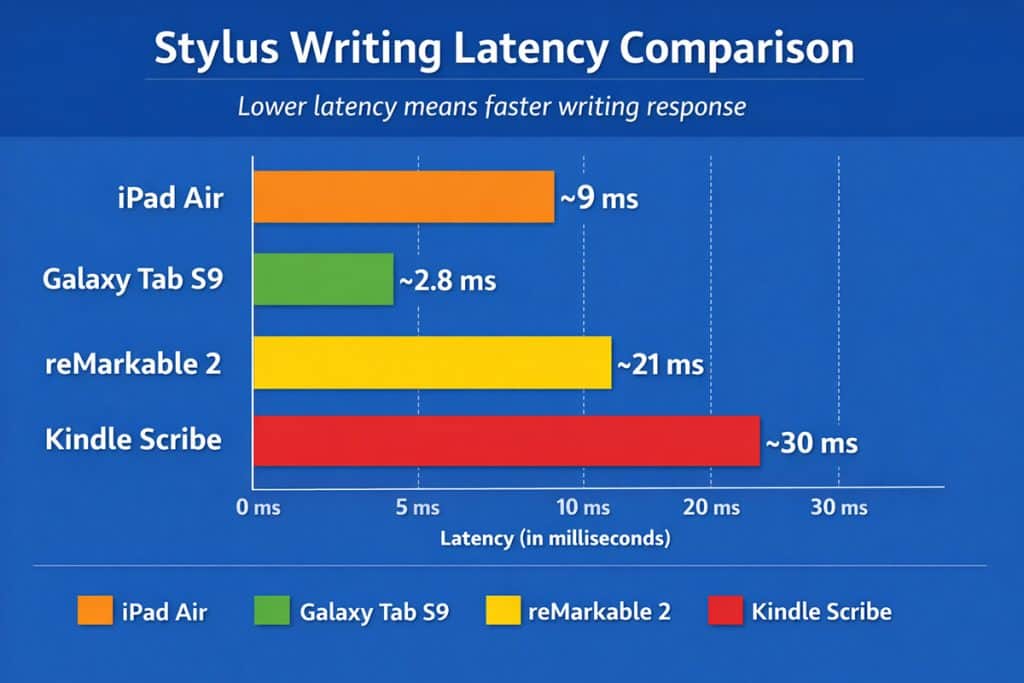
The stylus is the most important component of any note-taking tablet. A high-quality stylus should offer minimal latency so that digital ink appears instantly when the pen touches the screen.
Advanced styluses also support pressure sensitivity and tilt detection, allowing more natural handwriting and improved accuracy. Reliable palm rejection is equally important, as it enables users to rest their hand on the screen without triggering unintended input.
These features significantly improve the writing experience when using a tablet as a digital notebook.
Display Technology
Display technology directly affects both writing comfort and visual clarity.
E-Ink displays create a matte surface that closely resembles paper and reduces eye strain during extended writing sessions. LCD and OLED displays, on the other hand, provide brighter visuals, faster refresh rates, and smoother interactions with apps.
If your workflow involves hours of reading and writing, an E-Ink display may feel more comfortable. If you prefer multitasking, interactive apps, and media viewing, a traditional display will likely provide more versatility.
Note-Taking Software
Software plays a crucial role in how useful a tablet becomes over time. Some devices rely mainly on built-in note applications, while others support powerful third-party apps.
Popular apps such as GoodNotes, Notability, and Microsoft OneNote allow users to organize notebooks into folders, convert handwriting into text, and quickly search through large collections of notes.
When choosing among the best tablets for note taking, it is important to consider which applications you plan to use and whether they are supported on the device’s operating system.
Battery Life
Battery performance varies significantly depending on the type of tablet.
E-Ink tablets often last two to three weeks on a single charge because the display consumes very little power. Traditional tablets typically offer 10 to 12 hours of active usage, which is still enough for a full day of classes or work.
Students who travel frequently or attend long lectures may particularly appreciate the extended battery life of E-Ink digital notebooks.
Storage and File Organization
Digital note-taking can quickly generate large collections of notebooks, documents, and PDFs. Tablets that provide flexible file-management systems make it much easier to keep notes organized and accessible.
Look for features such as notebook folders, tagging systems, searchable handwriting, and cloud synchronization. These tools can significantly improve long-term productivity when using a tablet as your primary digital notebook.
Best Tablets for Different Note-Taking Needs
While all the tablets discussed in this guide perform well, some devices stand out for specific workflows and user preferences.
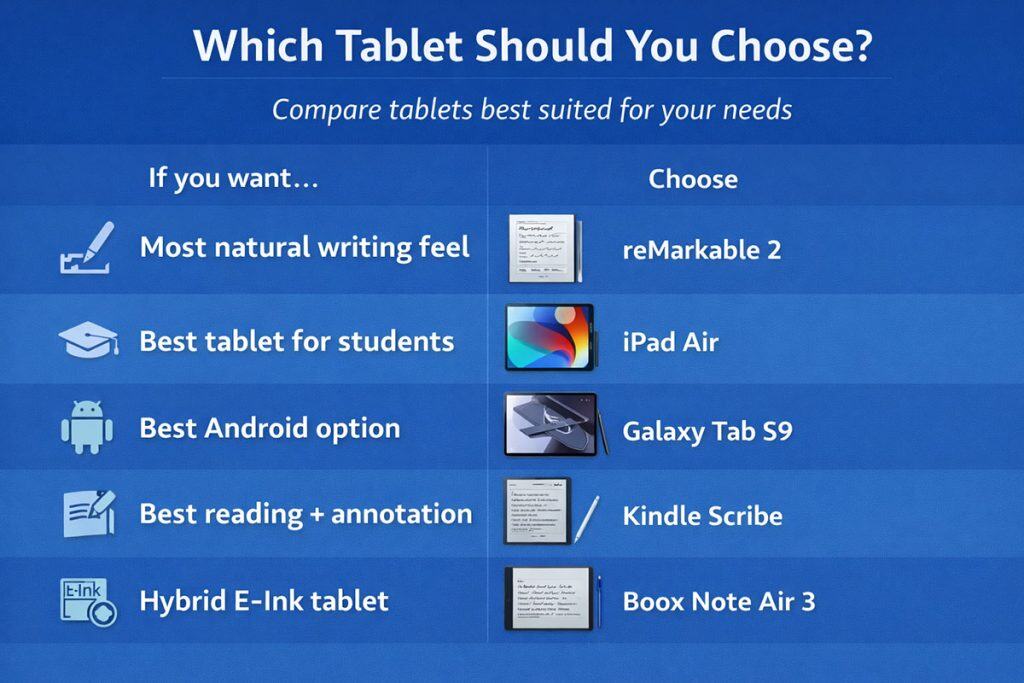
Best Tablet for Students
For students who want both note-taking and general productivity capabilities, the Apple iPad Air (2024) provides one of the best balances of performance, software support, and versatility.
Best Digital Paper Tablet
Users who prioritize a natural handwriting experience should consider the reMarkable 2, which delivers one of the most realistic paper-like writing experiences available among modern digital notebooks.
Best Android Tablet for Note Taking
Android users looking for a powerful productivity device will find the Samsung Galaxy Tab S9 particularly effective for handwritten notes, document annotation, and multitasking.
Best Hybrid E-Ink Tablet
For users who want the comfort of E-Ink writing combined with software flexibility, the Boox Note Air 3 offers one of the most capable hybrid solutions available.
Final Verdict: Choosing the Best Tablet for Note Taking
The best tablet for note taking ultimately depends on how you prefer to capture, organize, and review information. Some users prioritize the tactile feel of handwriting, while others value the flexibility of advanced productivity applications.
For a pure digital notebook experience that closely mimics paper, the reMarkable 2 remains one of the most compelling options. Its distraction-free design and highly natural writing feel make it ideal for focused study sessions and long writing tasks.
Users who want access to powerful apps, cloud synchronization, and multitasking capabilities will likely benefit more from the Apple iPad Air (2024). Its strong hardware and extensive app ecosystem make it one of the most versatile note-taking tablets available.
Android users searching for a capable alternative should consider the Samsung Galaxy Tab S9, which combines excellent stylus performance with strong productivity features.
Meanwhile, readers and researchers who frequently annotate documents may appreciate the strengths of the Kindle Scribe or the hybrid flexibility offered by the Boox Note Air 3.
Regardless of which device you choose, modern tablets can dramatically simplify note organization and create a more efficient digital workflow for studying, research, and professional work.
FAQ: Best Tablets for Note Taking
What is the best tablet for handwritten notes?
For the most natural handwriting experience, many users prefer E-Ink tablets such as the reMarkable 2 because their screen surface closely resembles real paper.
Are E-Ink tablets better for studying?
E-Ink tablets can be extremely comfortable for long study sessions because they reduce glare and eye strain. However, traditional tablets may offer more advanced productivity features and app support.
Can a tablet replace a traditional notebook?
Yes. Modern note-taking tablets allow users to create unlimited digital notebooks, organize notes into folders, search handwritten text, and synchronize files across multiple devices.
Which apps are best for note taking on tablets?
Popular note-taking apps include GoodNotes, Notability, and Microsoft OneNote. These applications allow users to combine handwriting, typed text, images, and document annotations within a single organized notebook system.
Do I need a stylus for tablet note taking?
While some tablets allow basic note entry with a finger or keyboard, a stylus provides a much more natural writing experience and greater precision when annotating documents or sketching diagrams.
Conclusion
Digital note-taking technology has improved dramatically in recent years, giving students, researchers, and professionals powerful alternatives to traditional paper notebooks. Whether you prefer the paper-like simplicity of an E-Ink device or the versatility of a full-featured tablet, the right tool can transform the way you capture ideas, organize information, and manage your work.
By understanding your note-taking workflow and selecting one of the best tablets for note taking, you can build a more efficient, flexible, and organized digital workspace that supports both study and productivity.

Hi, I’m Nurul! I love touching the latest gadget, unboxing them, and even smelling them! In this blog, I will share all my experiences. Hope you get the right idea about all kinds of gadgets from this blog.